Version 20.0.2
Here is an explanation of some updates in JNews v20.0.2
Improve the mechanism for fetching data from external APIs
We improved how JNews handles data requests from external APIs, such as Weather API, Instagram, TikTok, and other third-party services used by the theme.
In previous versions, some external API requests could be triggered again when the initial request failed. In certain situations, especially on websites with high traffic, these repeated requests could increase server load and affect website performance.
With this update, JNews handles failed external API requests more efficiently and reduces unnecessary repeated fetching. This helps lower server workload and improves overall website stability when an external API is unavailable, responding slowly, or temporarily experiencing issues.
Disable the Social Share Count API completely
We have disabled the API calls previously used to retrieve real social share counts from social media platforms.
Most major social media platforms no longer provide public APIs that allow websites to retrieve accurate share count data. As a result, these API requests may no longer return useful information and can create unnecessary external requests.
With this update, JNews no longer sends these unused API calls. This helps reduce unnecessary requests to third-party services and makes the social sharing feature more efficient.
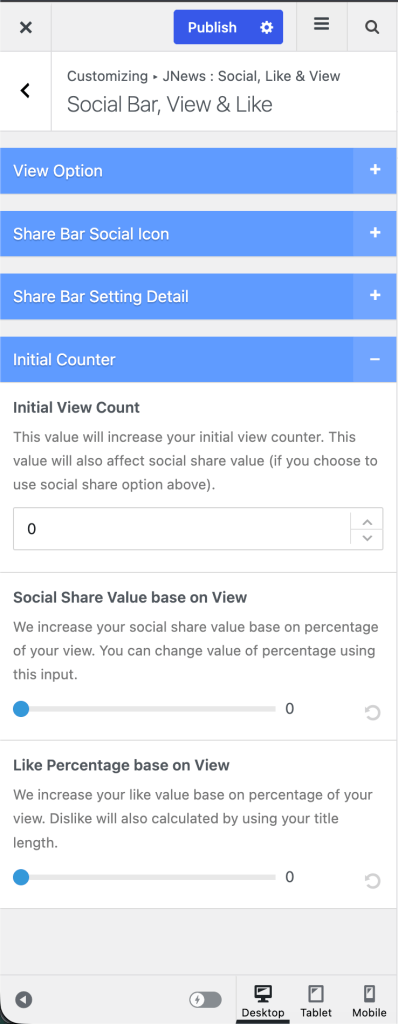
You can disable the social share counter entirely, or set a custom value using the Override Counter option in the Metabox. Alternatively, the Social Share Value based on view option lets you generate share counts from post view numbers.
If you prefer not to display the social share counter on your single post pages, you can disable it from the JNews settings.
Go to Appearance > Customize > JNews : Single Post Option > Single Post Option, then disable the Top Share Counter and Bottom Share Counter options. This will remove the share count displayed in the social share sections at the top and bottom of your posts.
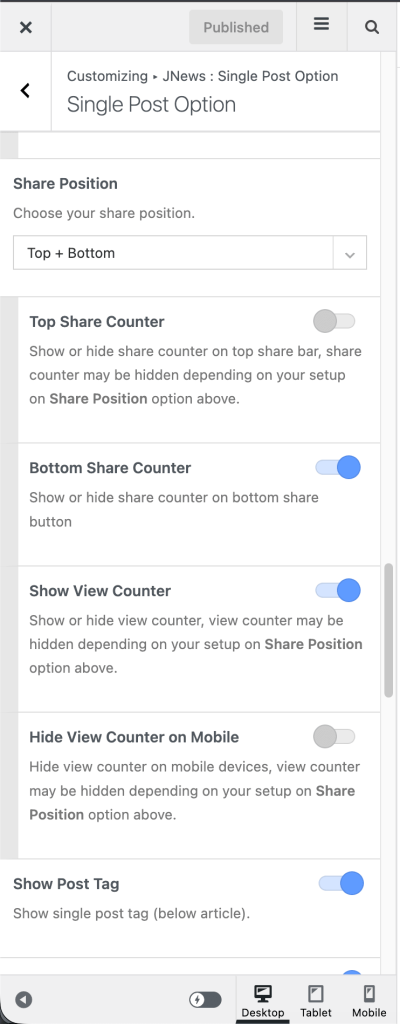
Alternatively, you can still display a share counter using a value calculated based on your article views instead of retrieving the actual share count from social media platforms.
To use this option, go to Appearance > Customize > JNews : Social, Like & View > Social Bar, View & Like > Initial Counter, then configure the Social Share Value base on View option. This allows JNews to generate the displayed share count based on a percentage of the article’s view count.